

Set up your business and first booking
Create a business profile, add a service, and check that customers can choose a time.
After signing in to Tulemi Business, select an existing business or go through the business setup form. If you manage several businesses, check which one you are editing before saving.
Create your business profile
Section titled “Create your business profile”- Enter the business name and contact details and choose a relevant category.
- Enter the address and opening hours. Review the summary and confirm the creation of the profile.
- Open Get started. Add a service and assign someone who provides it. You can assign yourself.
Get ready to accept your first booking
Section titled “Get ready to accept your first booking”- Set the provider's availability for the relevant days.
- In Get started, check which steps are complete and whether the panel shows a next available time.
- Open the customer view and check the service and time before sharing the booking link.
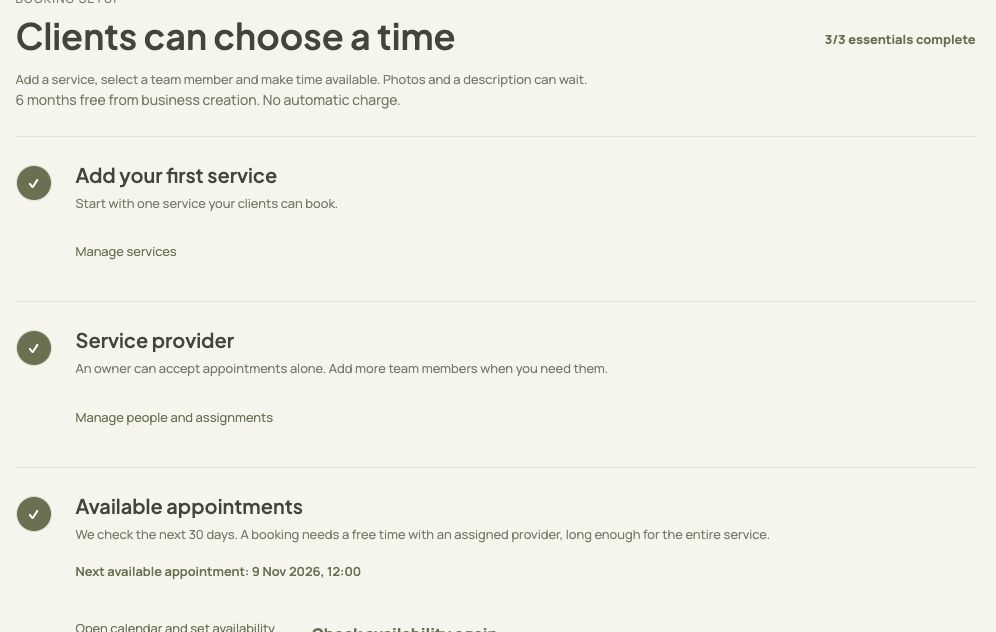
- Add the first service to your offer.
- Assign the person who provides the service.
- Check whether the panel shows an available time.
If you cannot continue
Section titled “If you cannot continue”- Check validation messages next to contact fields and opening hours. Each end time must be later than its start time.
- If business creation returns an error, check whether the business already appears in the list before trying again.